As of October 24, 2026, the TikTok Shop Black Friday Creator Challenge is a US-only, invitation-based opportunity for eligible creators to publish shoppable short videos during the holiday campaign. The official terms separate a November 1–30 content posting period from a challenge period that begins on November 11 at 4:00 p.m. Pacific Time, so joining the campaign requires more than posting a generic Black Friday video.
This guide explains which program you may be seeing, where to register, how the dates affect your production plan, and how to check products, offers, hashtags, and disclosures before you publish. TikTok Shop campaigns can vary by account and role, so use the live campaign card in Creator Center as the final source of truth.
What the Two 2026 Date Windows Mean
The official short video challenge terms list two overlapping windows. They are related, but they are not interchangeable.
| Window | What it means | How to use it |
|---|---|---|
| November 1–30, 2026, Pacific Time | Content Posting Period | Publish original, shoppable short videos with qualified products during the listed window. |
| November 11, 4:00 p.m. to November 30, 2026, Pacific Time | Challenge Period | Track the GMV and challenge activity that the terms use for challenge evaluation. |
| November 27, 2026 | Black Friday | Make your strongest gift, problem-solving, or offer-led posts easy to find and review. |
| November 30, 2026 | Cyber Monday | Refresh the products, price details, and calls to action before publishing a final wave. |
The terms state that only GMV generated during the Challenge Period counts toward the challenge, even though the Content Posting Period begins earlier. That makes November 1–10 useful for approved product tests and content preparation, but it does not make those posts a substitute for checking the challenge rules attached to your invitation. Review the published challenge dates before you batch content.
TikTok Shop's broader US seller campaign is also listed as November 11–30 Pacific Time. A seller campaign date is useful context for product offers, but it does not prove that a creator account or a particular listing is eligible. Check the current BFCM campaign guide for the role and account you use.
Check Which BFCM Program You Are Joining
Several TikTok Shop activities use the Black Friday and Cyber Monday name. Start by identifying the card or invitation in your account.
| Program | Who it is for | Main content or participation signal |
|---|---|---|
| Creator Short Video Challenge | Eligible US TikTok Shop creators who were invited before the Challenge Period | Original shoppable short videos using qualified products and the hashtag shown in the invitation |
| Creator Community ALL IN FOR BFCM | Members of Creator Connect, Top Tier, or TasteMakers | Shoppable videos or LIVE activity, community registration, and regional team participation |
| Seller BFCM Campaign | Eligible US sellers and their enrolled products | Seller Center registration, compliant listings, stock, and campaign offer requirements |
The Creator Community challenge runs from November 1 to December 1 and adds community or regional requirements. Its published instructions list #TikTokShopBlackFriday and #TikTokShopCyberMonday, with regional tags such as #TTSWest or #TTSNortheast for the relevant teams. Those requirements do not automatically apply to every creator who sees a Black Friday campaign. Check the Creator Community instructions if your account belongs to one of those communities.
Do not assume that a public blog post, a third-party dashboard, or a video from another creator is an invitation. The campaign card in Creator Center should tell you whether your account and selected products are eligible and what registration step is required.
Confirm Eligibility and Register in Creator Center
Use this sequence before you write a script or promise a discount in a video. The screenshots below are examples from the activity brief. Your account may show different names, metrics, eligibility, and dates.
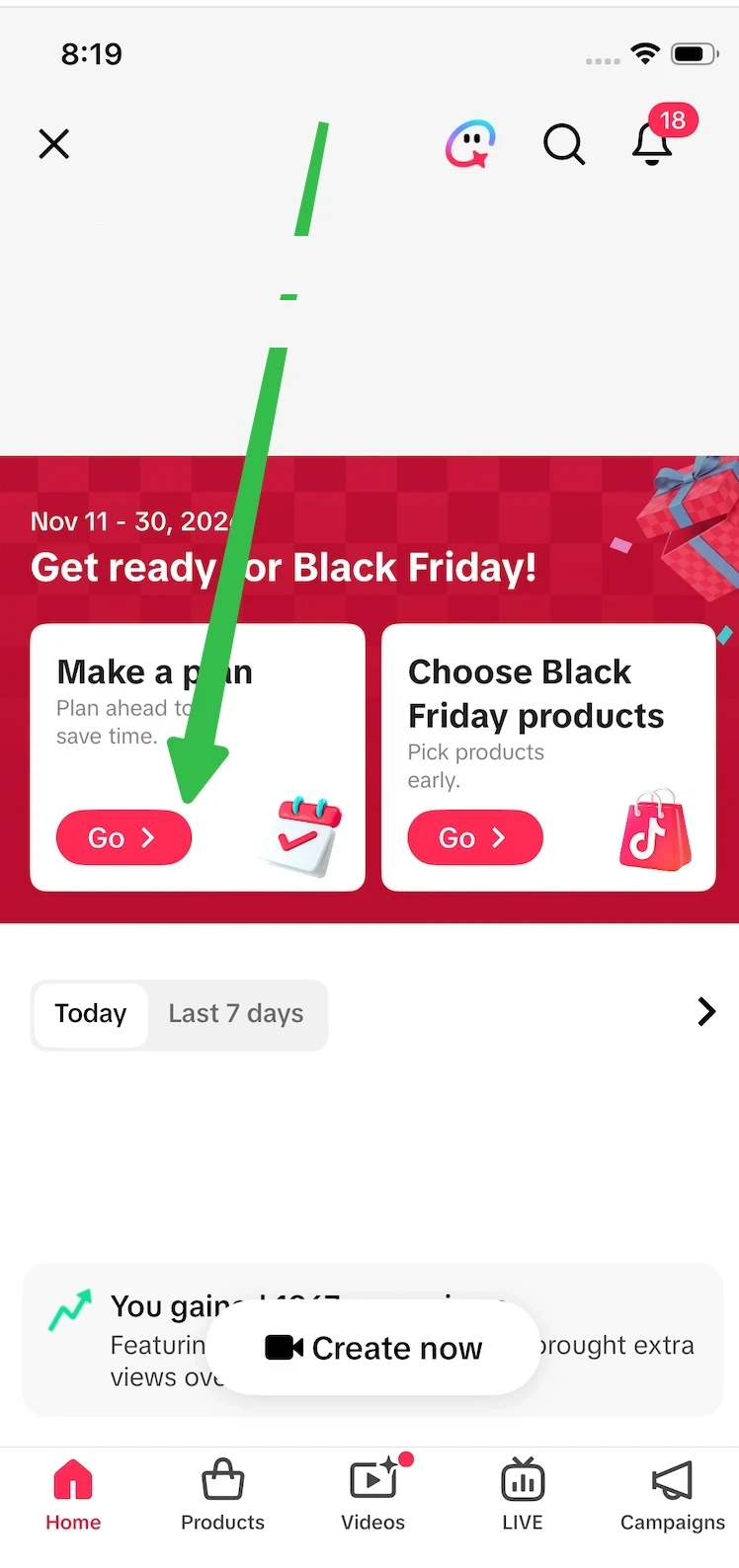
*Screenshot 1: the complete Creator Center screen from the Feishu activity brief, with account identity and performance figures redacted.*
- Open Creator Center and check Campaigns. Find the 2026 Black Friday and Cyber Monday campaign card. Read the invitation scope, dates, product requirements, and registration deadline shown for your account.
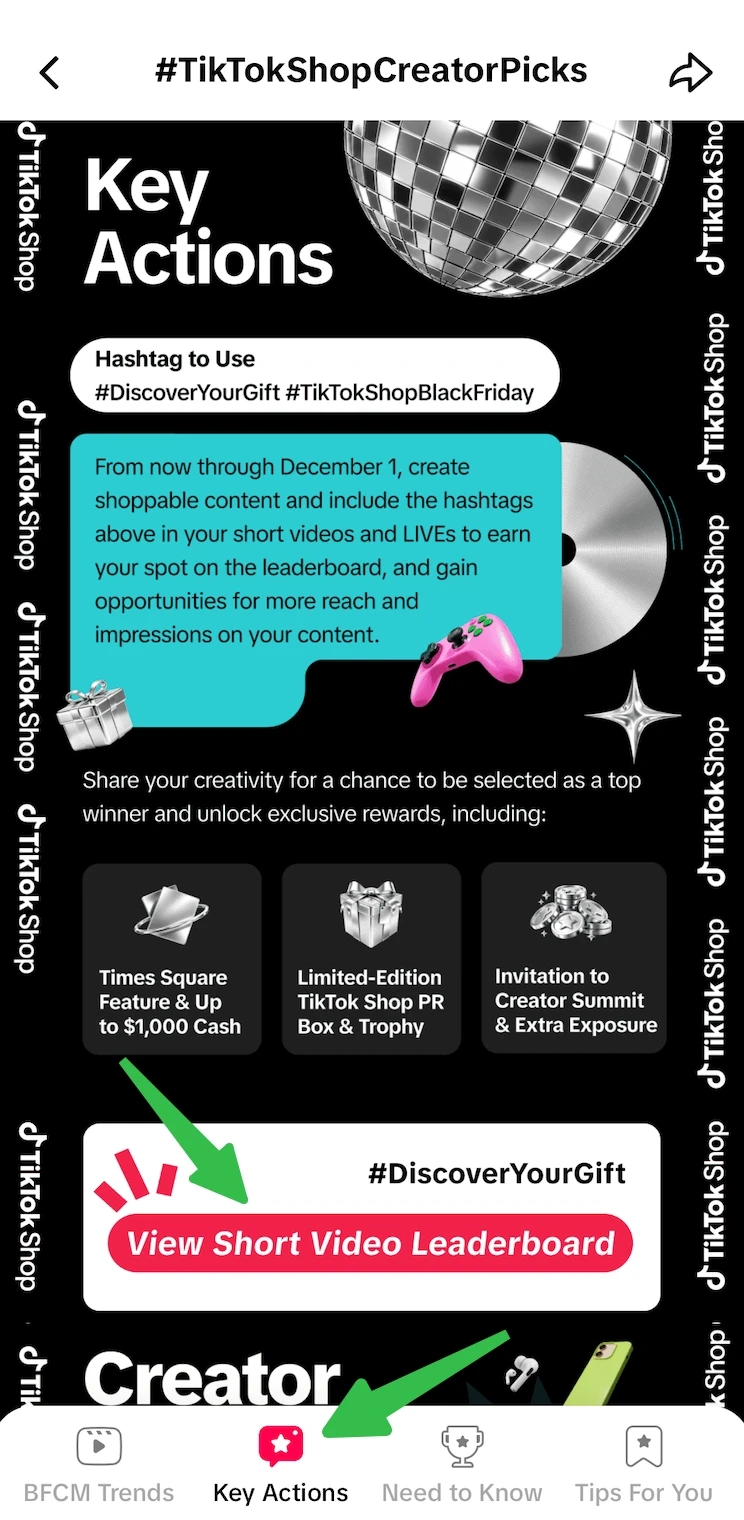
*Screenshot 2: the complete Key Actions screen from the Feishu activity brief.*
- Open Key Actions. Review the campaign card, required hashtags, and leaderboard CTA shown for your account. The internal brief calls out
#TikTokShopBlackFridayand#DiscoverYourGift, but your invitation is the final source for the tags you must use.
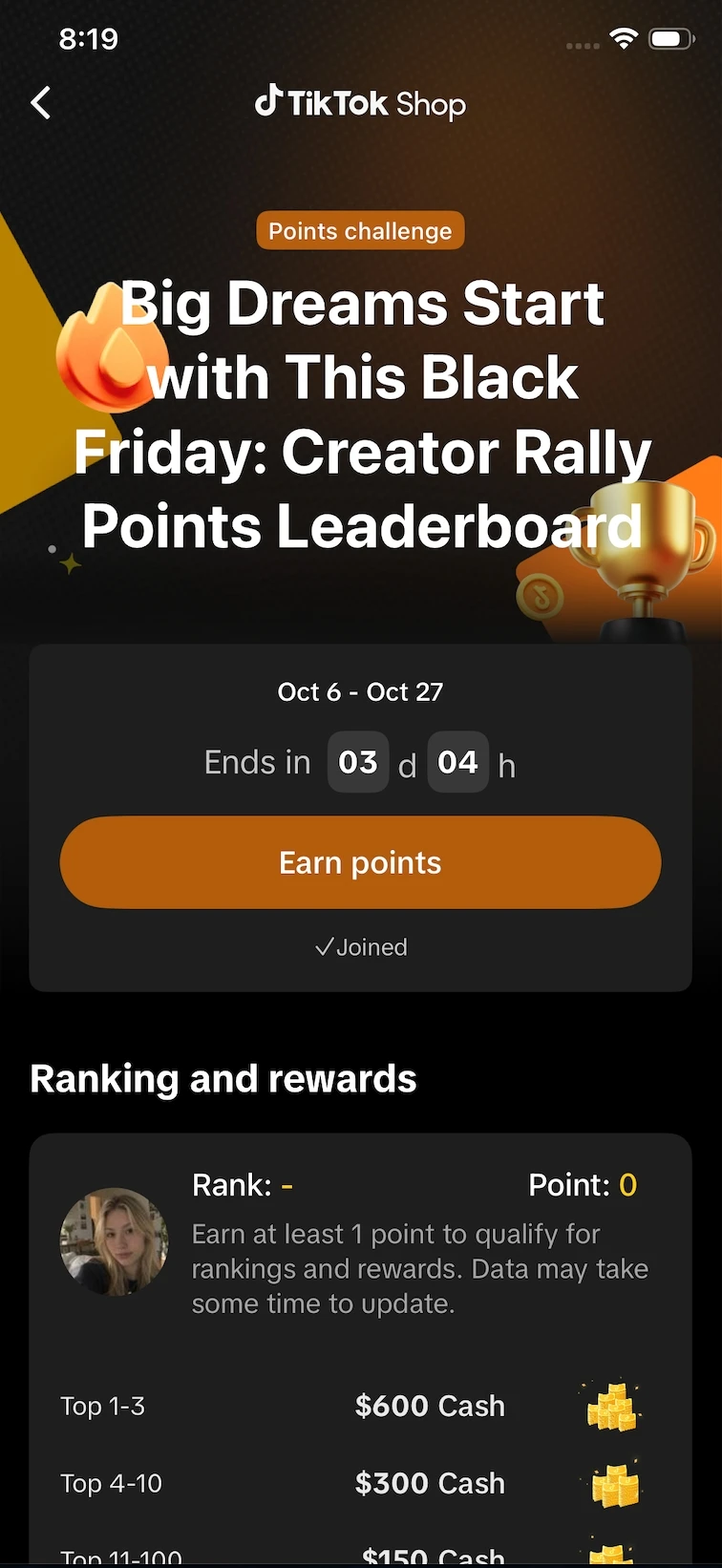
*Screenshot 3: an example of the separate “Big Dreams Start with This Black Friday” points challenge from the activity brief. Its Oct 6–27 window is distinct from the Nov 1–30 posting period and the Nov 11–30 challenge period. Use the dates shown in your own Creator Center account.*
- Choose the registration CTA. Open the leaderboard or campaign action, then select the “Big Dreams Start with This Black Friday” points challenge if it appears for your account.
- Opt in or register. The short video challenge terms require contestants to opt in or register as instructed in the invitation. Save a screenshot or note of the campaign name so you can match it to your content plan.
- Confirm the product. A product must be enrolled as a qualified product for the campaign that you are joining. Do not treat a normal product card as proof that it is part of the creator challenge.
- Check the account conditions. The creator campaign guide explains that the campaign page shows whether the account and products are currently eligible. A failed or missing condition needs to be resolved in TikTok Shop before you rely on the campaign for a publishing schedule. Check the creator campaign eligibility page for the current account-specific flow.
- Record the exact time zone. The official challenge dates use Pacific Time. Put the dates and time zone in your own content calendar so that a late-night post does not fall outside the window you intended.
Being able to open a campaign page does not guarantee a reward, a placement, a sale, or a commission. The program can also change its requirements or show different options for different creators. Treat your invitation as the operating document.
Build a Video Plan That Matches the Window
The strongest plan is a small set of related posts with different viewer jobs. One video can introduce the product, another can answer an objection, and a later post can refresh the offer after you confirm the listing again.
Use this production sequence:
Turn this sequence into a five-post plan with the Black Friday content planner before you write the scripts.
Before November 1: Prepare the Evidence
Shortlist products that fit your audience and have a clear use case. Verify the product name, variant, included quantity, shipping information, offer terms, and available stock. If you need a wider product shortlist, evaluate products worth testing before you build the scripts.
Write down the exact offer as it appears in the listing. A creator can say that a product has a current coupon only when the coupon, eligibility, and expiration details are visible and still valid. Do not turn an estimated commission into a claim about what viewers will save or what you will earn.
November 1–10: Publish Approved Tests and Prepare the Main Wave
Create a few different angles for the same product rather than repeating one generic sale announcement:
- a gift decision for a specific person
- a visible product demonstration
- a comparison against the problem the viewer is trying to solve
- an objection answer about size, setup, material, or use
- a final reminder that points viewers back to the product card
Keep each video original and shoppable. The challenge terms say that eligible content must be the creator's original work and must not have been previously published or used for another award. Use this period to review the video, product tag, caption, and required hashtag before you schedule the next version.
November 11–26: Scale the Angles That Earn Qualified Clicks
Once the Challenge Period begins, compare the product clicks, qualified orders, and settled commission data available in your TikTok Shop account. A view count alone does not tell you whether the product or angle is working. Keep the product explanation specific and change one meaningful variable at a time, such as the hook, first shot, objection, or call to action.
November 27–30: Refresh the Facts Before the Final Push
Black Friday and Cyber Monday are not permission to reuse an old price or an expired coupon. Reopen the listing and check the current variant, offer, stock, delivery promise, and commission before you publish the final wave. If any detail changed, rewrite the caption and on-screen wording before the video goes live.
For more examples of how to build a buying reason around a product, choose a concrete Black Friday video angle. For the wider seasonal workflow, plan the full Black Friday affiliate sequence.
Use the Required Hashtags Without Overpromising Reach
The short video challenge terms list #TikTokShopBlackFriday, #TikTokShopCyberMonday, and #DiscoverYourGift, or another hashtag stated in the challenge. The Creator Community instructions use the first two campaign hashtags and add regional tags for community participants.
Copy the tags from your own invitation and check the spelling before publishing. Hashtags can help the platform identify campaign content, but they do not guarantee views, ranking, GMV, or a prize. Use a small, relevant set of tags that describes the product and audience after you include the required campaign tags.
If you use AI to create a substantially generated video or depict a product that you have not personally tested, review the current AI content requirements and make sure the final content does not imply unsupported product performance. Moras can help prepare a video workflow, but you remain responsible for checking the product, disclosure, claims, and final post.
How Moras Fits the Workflow
Moras is useful after you have confirmed the campaign and selected a product. The Black Friday TikTok workflow can help you move from a product and audience angle to a seasonal video plan, then into a shoppable video that you review before publishing.
Use the workflow for production, not for campaign approval. It does not replace the Creator Center invitation, the product's campaign enrollment, the live offer, or your disclosure review. If you already know which product to promote, you can then turn the selected product into shoppable video variations and check each final version against the live listing.
Conclusion
The 2026 TikTok Shop Black Friday Creator Challenge rewards careful campaign matching more than a generic rush of holiday posts. Confirm the invitation, register in Creator Center, separate the November 1 posting window from the November 11 challenge window, and keep a record of the exact product, offer, hashtags, and time zone you used.
Start with a few evidence-based angles, measure qualified shop activity during the Challenge Period, and refresh every offer before the Black Friday and Cyber Monday push. A content planner can accelerate production, but the account's live TikTok Shop campaign card remains the final authority.