TikTok Shop Christmas gifts give affiliates a practical starting point for videos: name who the gift suits, show the relevant product detail, and help the viewer check the linked item. You can start from an available Moras video without filming or preparing a sample. Review the product, wording, and current offer before publishing. Qualifying purchases through your shoppable post can earn you commission.
This guide uses two existing Moras videos, fragrance and cookware, to show how a gift angle can work. The clips are AI-generated examples already in the product gallery. The Christmas openers below are new editorial suggestions, not the clips' original scripts or evidence of holiday sales.
Choose a Recipient Before Choosing the Video
A useful gift angle connects a person to a reason they might want the product. “A gift for someone who enjoys cooking family dinners” gives a cookware video a clear job. “The perfect gift for everyone” gives the viewer little help deciding.
Use the recipient to narrow your idea, then verify the item. These are planning examples, not a ranking of the best-selling Christmas gifts:
| Recipient | Useful Video Angle | What to Confirm |
|---|---|---|
| Someone who enjoys fragrance | Packaging, bottle size, and the listed scent family | Exact fragrance, size, notes, and gift-set contents |
| A home cook | A familiar meal and a close look at the cookware | Dimensions, material, included lid, and supported uses |
| A coworker or stocking-stuffer recipient | A small, useful item within the viewer's chosen budget | Current price, dimensions, availability, and delivery estimate |
“Under $25” can be a useful budget filter when the linked variant really meets it. It is not a universal price point that guarantees more sales. If your product does not fit the budget, change the angle rather than inventing a discount.
Once the recipient and product facts are clear, build a hook, demonstration, and CTA around that single idea. Keep the wording specific enough that the viewer can tell whether the item suits their recipient.
Fragrance Gift: Make the Recipient Specific
The existing fragrance video shows a presenter holding a black-and-gold bottle and cuts to a product close-up. The bottle and presentation give you a visual starting point for discussing a gift. They do not establish how the fragrance smells, how long it lasts, or whether someone has personally worn it.
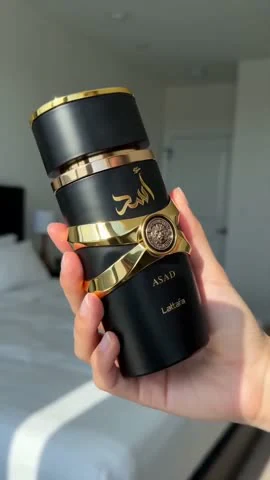
For a new Christmas version, try an opener such as “Choosing a fragrance gift for someone who already has a favorite scent family?” Follow it with the selected listing's verified notes and bottle size, then direct the viewer to check the exact version and current price.
The sequence has three jobs: identify the recipient, show the bottle clearly, and make the next check easy. If you cannot verify the scent notes, focus on the packaging or size instead. Avoid personal claims such as “My mom loves this” unless they describe a real experience you can support.
If you use an existing ready-to-post video, review its actual narration and images as they are. A new gift caption does not change a conflicting line inside the video. Choose another available video or create a new version when the original does not fit.
Cookware Gift: Show a Useful Dinner Scene
The existing cookware video shows a blue lidded pot on a stovetop and a meal inside it. That sequence can support a gift idea for someone who enjoys preparing dinner. Treat the scene as an AI-generated illustration of a use case, not a recorded cooking test.
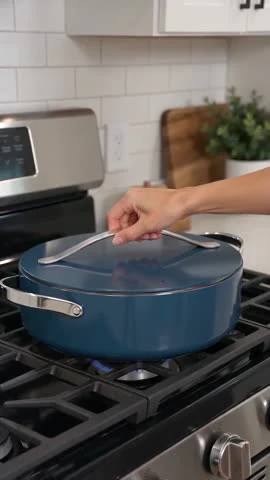
For a new Christmas version, an opener could be “A practical Christmas gift idea for the person who enjoys making family dinners.” Then show the cookware's shape and lid, explain a use supported by the listing, and invite the viewer to check its size and what is included.
Before posting, compare the video with the exact linked product. The gallery calls this example “Ceramic Pan,” but the name, material, dimensions, and compatibility in your own post must match the item you select. Oven use, nonstick performance, and dishwasher safety need evidence. A convincing AI scene cannot supply that evidence by itself.
You can carry a suitable product from Black Friday into a Christmas gift series. Review the whole video for expired sale wording, stock claims, or delivery promises before reusing it. For the November campaign workflow, plan your Black Friday affiliate posts.
Start with an Available Video or Create Your Own
You do not need to arrive with a product shortlist, footage, or an edited video. Moras currently serves US TikTok Shop creators with more than 4,000 followers and the relevant account permissions. That is Moras's current access requirement, not a universal TikTok eligibility rule.
Connect your account and use the route that fits what you find:
- Choose an available video. Browse the ready-to-post videos and select one that fits your gift idea. You can go straight to review without generating another video.
- Create a new video when needed. If the available selection does not fit, choose an item from the high-potential product library and have Moras prepare a new video. English and Spanish voiceovers are supported. Generation usually takes around five minutes, with timing that can vary.
- Review and publish. Check the video, linked product, posting caption, hashtags, and required disclosures. Confirm the post when your account permissions allow.
Moras is free to use, with no paid subscription or tokens and credits to buy. Daily usage limits may apply. If you want to understand the creation route before starting, see how to create a shoppable product video.
Plan Around Confirmed Offers and Delivery Estimates
As of October 15, 2026, TikTok Shop's US BFCM campaign runs November 11–30. That window does not establish December promotion dates or a Christmas delivery deadline for every product.
Prepare gift ideas while you review November products. During a confirmed promotion, use its actual price and terms. When you move into December, check the listing again and remove expired Black Friday claims. You can map posts against the seasonal calendar, but your account's campaign card and the current product details should determine the claims in each post.
There is no single last date to promise Christmas arrival. Check the delivery estimate shown for the buyer's location and avoid turning an estimate into a guarantee. If timely arrival is uncertain, drop the Christmas-arrival promise and use an ordinary gift or everyday-use angle where it remains relevant.
Check Product Claims and Disclosures Before Posting
Compare the item's appearance, size, variant, included accessories, and supported use with the video. TikTok Shop requires accurate AI product depictions and disclosure. Creators remain responsible for reviewing synthetic scenes and applying the required AI disclosure.
For affiliate endorsements, make the commercial relationship clear. FTC guidance says the disclosure should be in the video itself, rather than only in the description. AI disclosure and affiliate disclosure communicate different things. Check both before publishing.
After posting, review product clicks and commission from qualifying purchases. Compare videos with similar offers and availability before deciding which gift angle to repeat. The examples here do not establish a target click-through rate or guarantee earnings.
When you are ready, .